In This Article
Why a wifi bird cam Is the Best Seat in Your Backyard
Here’s a funny truth about backyard birding: most of the action happens while you’re doing the dishes, sitting in a meeting, or asleep. A chickadee grabs a sunflower seed in 1.5 seconds and vanishes. A grosbeak you’ve never seen before passes through for two days during migration. Without a camera, you’d never know.
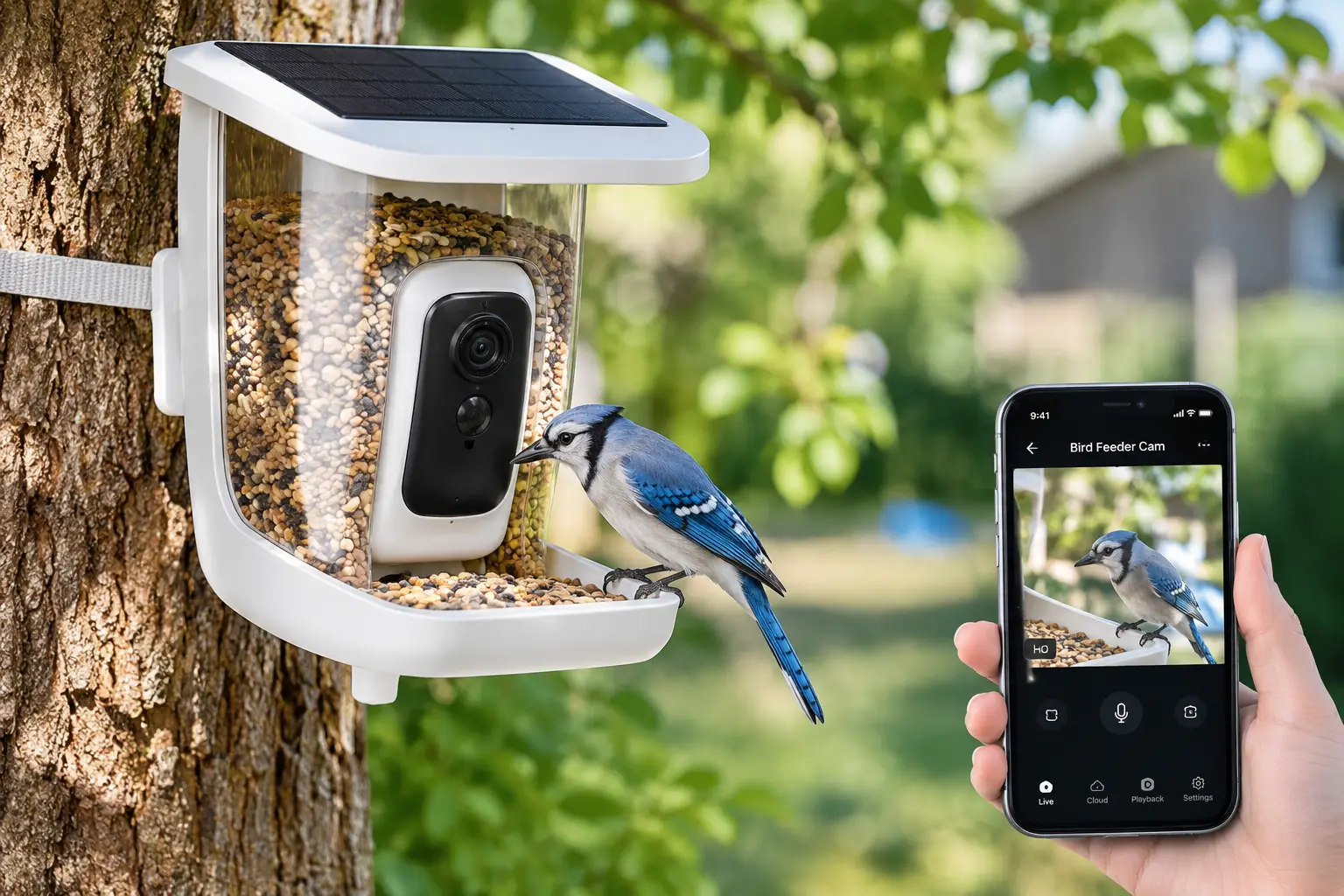
That’s exactly the gap a wifi bird cam fills. It’s a weatherproof camera built into (or mounted on) a feeder or birdhouse that connects to your home network, detects movement, and sends photos, video clips, and often an AI species ID straight to your phone. In other words, your yard becomes a private nature documentary you can check from anywhere.
The category has matured fast. In 2026, you’ll find 2K and 2.5K sensors, HDR, solar roofs, full-color night vision, multi-lens designs, and even nest box cameras that let you watch eggs hatch. At the same time, the market is crowded with lookalike listings, confusing subscription plans, and “10,000+ species” claims that deserve a skeptical eye.
This guide cuts through that noise. We compared real spec sheets, manufacturer documentation, and aggregated customer and expert review sentiment for seven models you can find on amazon.com, from budget-friendly solar feeders to a triple-lens flagship and a dual-camera smart birdhouse. You’ll also get setup tips, a troubleshooting guide, a total-cost breakdown, and advice on keeping your feathered visitors healthy (a detail most listings conveniently skip). If you want to turn your sightings into real science, programs like Cornell Lab’s Project FeederWatch welcome backyard observers and publish excellent guidance on feeding birds safely.
Ready? Let’s find the right wifi bird cam for your yard, your Wi-Fi, and your budget.
What Is a wifi bird cam?
A wifi bird cam is an outdoor camera, usually integrated into a bird feeder or nest box, that connects to your 2.4GHz home Wi-Fi network. It uses motion detection to capture photos and video of visiting birds, streams live footage to a smartphone app, and often identifies species with AI.
How it works in practice
Most models pair a camera module with a rechargeable battery and a small solar panel. When a bird lands, a motion or proximity sensor wakes the camera, which records a short clip, uploads it to the cloud (or saves it to a microSD card), and pushes a notification to your phone. The app then suggests a species name, which you can confirm or correct. Some platforms, like the Bird Buddy and Birdfy apps, let you invite family members to the same feed, so Grandma in Ohio gets the cardinal alert at the same moment you do.
Quick Comparison: The Best wifi bird cam Models at a Glance
| Model | Type | Standout Feature | Approx. Price Range | Best For |
|---|---|---|---|---|
| Bird Buddy Pro Solar | Smart feeder | 5MP HDR photos, 2K video | $180–$260 | Bird Buddy Pro Solar: photo quality lovers |
| Birdfy Feeder 2 Duo | Smart feeder | Three camera angles | $280–$330 | Birdfy Feeder 2 Duo: tech enthusiasts |
| NETVUE Birdfy Feeder | Smart feeder | microSD + cloud, wide perch | $130–$200 | NETVUE Birdfy Feeder: flexible storage |
| isYoung 2.5K Smart Bird Feeder | Smart feeder | Full-color night vision | $100–$180 | isYoung 2.5K Smart Bird Feeder: dawn and dusk activity |
| HARYMOR 2K Bird Feeder Camera | Smart feeder | Triple solar, 2L seed tray | $80–$120 | HARYMOR 2K Bird Feeder Camera: value seekers |
| SOLIOM Smart Bird Feeder Camera | Smart feeder | Metal, squirrel-resistant body | $90–$130 | SOLIOM Smart Bird Feeder Camera: squirrel-heavy yards |
| Birdfy Nest Duo | Smart birdhouse | Inside + outside cameras | $150–$250 | Birdfy Nest Duo: nesting season fans |
Prices are approximate ranges at the time of writing and change often. Check the current price on Amazon.
Looking at the table, the split is clear: the Bird Buddy Pro Solar and Birdfy Feeder 2 Duo compete on image quality and features, while the HARYMOR 2K Bird Feeder Camera and SOLIOM Smart Bird Feeder Camera win on price. The Birdfy Nest Duo is the odd one out on purpose: it watches nesting behavior rather than feeder traffic, which makes it a great second camera rather than a first one.
💬 One click helps other shoppers make an informed choice too! 😊
Top 7 wifi bird cam Picks for 2026: Expert Analysis
1. Bird Buddy Pro Solar — sharpest photos in its class
If crisp, frame-worthy stills matter most to you, the Bird Buddy Pro Solar is the benchmark. According to Bird Buddy’s own spec sheet, it pairs 5MP HDR photos and 2K video with a 1/2.7-inch sensor, a 122-degree field of view, a 3,800mAh battery, IP67 weather resistance, and an operating range from -5°F to 120°F. In practice, HDR matters more than the megapixel count: a bird backlit by a bright sky no longer turns into a dark silhouette, so you spend less time fussing over which direction the feeder faces. The wide temperature range also means it keeps working through a Minnesota January, where many rivals stop at 14°F.
Our take: this is the best choice for a first-time smart feeder owner who wants the most polished app and share-worthy photos. It’s less ideal if you hate subscriptions, because Bird Buddy reserves “2K Ultra” quality and several advanced insights for its Premium plan, although species ID, live streaming, and sharing remain free.
Review sentiment: expert reviews, including CNN Underscored’s hands-on Bird Buddy Pro review, consistently praise the jump in detail and brightness over the original model, while a recurring complaint is a slight delay before notifications arrive.
Pros:
- ✅ HDR keeps backlit birds bright and detailed
- ✅ IP67 rating and -5°F cold tolerance
- ✅ Polished app with family sharing for up to ten people
Cons:
- ❌ Top video quality sits behind a Premium subscription
- ❌ Requires 2.4GHz Wi-Fi with no local storage fallback
Expect roughly $180 to $260 depending on the solar bundle; it’s fair value if photo quality is your priority.
2. Birdfy Feeder 2 Duo — three angles, zero missed landings
The Birdfy Feeder 2 Duo solves the most common smart feeder frustration: a bird lands on the wrong edge and you get a blurry tail feather. Its triple-lens system combines a 2K rotating lens that tracks moving birds, a 1080p wide-angle lens for context, and a side-mounted HD camera. What that means for you is simple: if a bird is out of frame from one angle, it’s almost certainly in frame from another. The 9,000mAh battery with solar support, IP66 rating, and free, permanent AI ID for 6,000+ species round out the package, and it picked up a CES 2025 Innovation Award.
Our take: this is the gadget lover’s pick, and it’s surprisingly useful for anyone who enjoys bird behavior, not just species lists. Watching the same bird from multiple perspectives reveals foot placement, posture, and flock interactions that a single fixed lens misses. If you only want a daily “who visited” log, however, you’re paying for capability you won’t use.
Review sentiment: reviewers repeatedly highlight the multi-angle footage and generous battery, while the dominant criticism is simply the price, which sits at the top of this category.
Pros:
- ✅ Three lenses dramatically reduce off-frame captures
- ✅ Free lifetime AI ID with no subscription required
- ✅ Huge 9,000mAh battery backed by solar
Cons:
- ❌ Most expensive feeder camera in this lineup
- ❌ Operating range stops at 14°F in deep cold
At roughly $280 to $330, it’s premium money for premium footage, and the zero-subscription AI softens the long-term cost.
3. NETVUE Birdfy Feeder — the flexible storage workhorse
The NETVUE Birdfy Feeder is the model that helped launch this category, and it still earns its spot through flexibility rather than flash. It records 1080p video, supports both microSD and cloud storage, offers AI species recognition for 6,000+ species, and works with add-ons like the Hummee hummingbird attachment. The wider perch is an underrated detail: when a flock of chickadees or finches arrives, several birds can land at once, so you capture social behavior instead of one bird at a time.
Our take: this is the smartest pick for households with spotty Wi-Fi near the feeder. Because clips can save locally to microSD, a brief network dropout doesn’t mean a lost visit. It’s also a strong gift for parents or grandparents who want a live view they can pull up on a phone without learning a complicated app.
Review sentiment: long-term reviewers report excellent battery life, often one to two months per charge without solar, but note that images are softer than the Bird Buddy, with occasional color fringing. Buyers also mention that motion detection can be overly sensitive and that the included straps aren’t always a secure mount.
Pros:
- ✅ microSD plus cloud storage for reliable recording
- ✅ Wide perch captures multiple birds at once
- ✅ Modular accessories, including a hummingbird add-on
Cons:
- ❌ 1080p footage looks softer than 2K rivals
- ❌ Sensitive motion detection can trigger on non-birds
Typically priced between $130 and $200 depending on bundle, it remains solid value for flexible, dependable recording.
4. isYoung 2.5K Smart Bird Feeder — full-color footage at dawn
The isYoung 2.5K Smart Bird Feeder targets a real blind spot: the low-light hours around sunrise and sunset, when feeder traffic often peaks. Instead of flipping to grainy black-and-white infrared, it offers full-color night vision, paired with a 2.5K QHD sensor and an unusually wide 170-degree field of view. It also runs on dual solar panels (5W total) feeding a removable 5,000mAh battery, which means you can swap the battery instead of hauling the whole feeder indoors.
Our take: if you’re up at 6 a.m. with coffee and want to know who was at the feeder before you, this camera is designed for you. The very wide lens is a double-edged sword, though: it catches birds perched on the edges, but at 170 degrees subjects appear smaller in the frame, so close-up feather detail won’t match the Bird Buddy.
Review sentiment: buyers generally report that the AI correctly identifies common backyard species and that the listed 16,000+ species database carries no subscription. A frequently mentioned quirk is that AI identification works during live view rather than on recorded playback, and it can stumble on lookalike species, as all feeder AIs do.
Pros:
- ✅ Full-color night vision for dawn and dusk visits
- ✅ Removable battery simplifies charging
- ✅ Lifetime-free AI identification
Cons:
- ❌ Wide 170-degree view makes birds look smaller
- ❌ AI ID doesn’t run on recorded clips
Generally sold in the $100 to $180 range, it’s excellent value for true-color, around-the-clock footage.
5. HARYMOR 2K Bird Feeder Camera — best value for hands-off solar
The HARYMOR 2K Bird Feeder Camera is one of Amazon’s best-selling feeder cams, and the reason is obvious: it delivers 2K video, a 120-degree lens, a 5,200mAh battery, and three solar panels (two in the roof plus one external) for well under the price of the big-name brands. That triple solar setup matters in cloudy regions like the Pacific Northwest, where a single small panel can struggle to keep up in winter. The generous 2-liter seed tray also means fewer trips outside to refill.
Our take: this is the right choice for budget-conscious buyers who mainly want live video and alerts. However, read the fine print: species identification runs through the VicoHome app and sits behind a subscription, while live and recorded video work without paying. It also must be pole-mounted on a flat surface, so it can’t hang from a branch or shepherd’s hook.
Review sentiment: aggregated reviews praise the battery self-sufficiency and seed capacity, but a common complaint is hit-or-miss AI accuracy, including suggestions of species that don’t occur in the buyer’s region.
Pros:
- ✅ Triple solar panels keep the battery topped off
- ✅ Large 2L seed tray reduces refills
- ✅ Crisp 2K video at a budget price
Cons:
- ❌ Species ID requires a VicoHome subscription
- ❌ Pole mount only, no hanging option
Usually found between $80 and $120, it’s the value champion as long as you budget for the ID subscription or skip it.
6. SOLIOM Smart Bird Feeder Camera — built tough for squirrel country
If your yard is run by a gang of gray squirrels, the SOLIOM Smart Bird Feeder Camera deserves a close look. Its standout feature is a metal housing rather than the plastic shell common at this price, paired with 2K live view, AI bird recognition, a solar panel with a rechargeable battery, and arrival alerts through the Soliom Pro app. Metal matters here because squirrels don’t just steal seed; persistent ones chew plastic edges and cable covers, which can shorten a cheap camera’s life to a single season.
Our take: this is a smart first wifi bird cam for someone who wants the core experience (live view, alerts, AI ID, solar) without spending premium money, and who lives where wildlife pressure is high. Just don’t expect the app polish of Bird Buddy or Birdfy.
Review sentiment: owners tend to describe the build quality as the highlight and the app as the weak point, calling it more basic and less refined than premium competitors. Like other budget feeders, its AI is reliable on common birds but can confuse lookalikes, so pairing it with a free ID app is wise.
Pros:
- ✅ Metal body resists squirrel damage
- ✅ Solar charging included in the box
- ✅ Covers the essentials at an entry-level price
Cons:
- ❌ Soliom Pro app feels less polished
- ❌ AI stumbles on similar-looking species
Expect roughly $90 to $130; for squirrel-heavy yards, the durability makes it one of the smartest budget buys.
7. Birdfy Nest Duo — a front-row seat to nesting season
The Birdfy Nest Duo is not a feeder at all; it’s a wifi bird house camera with two cameras, one inside the nest box and one outside. According to Birdfy’s documentation, it uses dual 2MP (1080p) cameras with built-in audio, an IP66 rating, a solar panel, and a 2.4GHz Wi-Fi connection, and it operates from 14°F to 113°F. The inside camera lets you watch nest building, eggs, and hatching without opening the box, while the outside camera catches parents arriving with food. Four interchangeable entrance sizes with metal predator guards let you tailor it to bluebirds, wrens, chickadees, or swallows.
Our take: this is the best gift for someone who already feeds birds and wants a deeper, story-driven experience. The 180-degree magnetic door makes post-season cleanout easy, which is essential for reuse. Keep in mind that a nest box is a waiting game: some seasons it sits empty.
Review sentiment: verified long-term owner reviews are thinner than for Birdfy’s feeders, so we won’t overstate them. What we can confirm is the documented feature set, and that Birdfy’s AI behavior recognition terms vary by nest model, so check whether your version includes it free.
Pros:
- ✅ Inside and outside cameras tell the full nesting story
- ✅ Interchangeable entrances with metal predator guards
- ✅ Magnetic door simplifies seasonal cleaning
Cons:
- ❌ Occupancy isn’t guaranteed every season
- ❌ 1080p cameras trail today’s 2K feeders
Typically in the $150 to $250 range; it’s strong value if nesting season is what excites you most.
Head-to-Head Specs: Comparing All 7 Models
| Model | Resolution | Power | Storage | AI Bird ID | Best For |
|---|---|---|---|---|---|
| Bird Buddy Pro Solar | 5MP photos, 2K video | 3,800mAh + solar roof | Cloud | Free (advanced features Premium) | Bird Buddy Pro Solar: stills |
| Birdfy Feeder 2 Duo | 2K + 1080p + side HD | 9,000mAh + solar | Cloud (30-day retention) | Free, 6,000+ species | Birdfy Feeder 2 Duo: behavior |
| NETVUE Birdfy Feeder | 1080p | Battery + optional solar | microSD + cloud | 6,000+ species | NETVUE Birdfy Feeder: weak Wi-Fi |
| isYoung 2.5K Smart Bird Feeder | 2.5K QHD | 5,000mAh + dual solar | Cloud | Free, 16,000+ species | isYoung 2.5K Smart Bird Feeder: low light |
| HARYMOR 2K Bird Feeder Camera | 2K | 5,200mAh + triple solar | Cloud | Subscription | HARYMOR 2K Bird Feeder Camera: budget |
| SOLIOM Smart Bird Feeder Camera | 2K | Battery + solar | Cloud | Included | SOLIOM Smart Bird Feeder Camera: durability |
| Birdfy Nest Duo | Dual 1080p | Battery + solar | Cloud | Varies by model | Birdfy Nest Duo: nesting |
Reading the specs side by side, battery capacity varies more than resolution does: the Birdfy Feeder 2 Duo carries more than twice the Bird Buddy Pro Solar‘s capacity, which matters in shady yards. Meanwhile, the NETVUE Birdfy Feeder is the only feeder here with local microSD backup, a quiet but decisive advantage if your router is far from the yard. Finally, notice the AI column: “free” versus “subscription” will shape your costs more than any sensor spec.
✨ Don’t miss the right fit for your yard!
🔍 Take your backyard birding to the next level with this carefully curated lineup. Click a highlighted model to check current pricing and availability. These picks will help you capture cardinals, chickadees, and nesting bluebirds the whole family will love!
How to Set Up Your wifi bird cam for Great Footage
A great camera in a bad spot produces bad footage. Fortunately, a few setup habits make a huge difference.
Before you mount anything
- ✅ Test the signal first. Stand where the feeder will go and run a speed test on your phone using your 2.4GHz network. Nearly all of these cameras require 2.4GHz, and a weak signal is the number one cause of laggy live view.
- ✅ Charge fully indoors. Top off the battery before installation, even on solar models; panels maintain a charge far better than they build one from empty.
- ✅ Update firmware and the app while the camera is still on your kitchen table, not on a pole.
Placement that birds (and cameras) like
Mount feeders about 5 to 6 feet off the ground, ideally within 10 feet of natural cover such as shrubs, so birds feel safe but predators can’t ambush them. Aim the lens away from direct sun: facing north or keeping the sun behind the camera prevents washed-out images, although HDR models like the Bird Buddy Pro Solar tolerate backlighting better. Nest boxes like the Birdfy Nest Duo should hang at least 8 feet up, according to Birdfy’s guidance, preferably in a spot shaded from the harsh afternoon sun.
Your first 30 days
Birds usually need a few days to a couple of weeks to discover and trust a new feeder, so don’t panic over an empty first weekend. Use black oil sunflower seed to attract the widest range of species early on. Then, once visits start, fine-tune motion sensitivity: lower it if you’re getting clips of swaying branches, raise it if small birds like goldfinches aren’t triggering alerts. Finally, correct misidentified species in the app; several platforms use your corrections to improve over time.
Which wifi bird cam Fits Your Backyard? Real-World Scenarios
Specs are abstract, so let’s apply them to real households.
Scenario 1: The busy suburban family
You live in a suburb with a small fenced yard, two kids, and a strong router in the living room 25 feet from the back fence. Budget: around $200. You want something fun and educational that everyone can watch. The Bird Buddy Pro Solar fits beautifully: family sharing, “postcard”-style captures kids love, and HDR photos that make a house finch look like a magazine cover. Mount it on a pole visible from the kitchen window so the kids connect the alert with the real bird outside.
Scenario 2: The retiree with a rural acreage
You have a large lot, heavy squirrel and raccoon traffic, and a detached garden area where Wi-Fi is patchy. You check the feed several times a day and want low maintenance. Here, the NETVUE Birdfy Feeder earns its keep thanks to microSD backup, while a Wi-Fi mesh node or outdoor extender solves the range problem. If squirrels are the bigger concern, the metal-bodied SOLIOM Smart Bird Feeder Camera is the tougher alternative.
Scenario 3: The apartment balcony birder
You rent a third-floor apartment with a balcony railing and a tight budget under $120. You mainly want live view and notifications. The HARYMOR 2K Bird Feeder Camera delivers 2K video and solar self-sufficiency for less, but because it requires a pole mount, confirm your railing setup (a clamp-on pole bracket usually works) and check your lease rules on feeders first.
Troubleshooting: Common Problems and Fixes
Even the best smart feeder hits a snag occasionally. Here are the most common issues and how to fix them.
Problem 1: Live view keeps buffering
Solution: Confirm you’re on 2.4GHz, not 5GHz, since most feeder cams only support 2.4GHz. Next, move the router, add a mesh node near a back window, or use an outdoor-rated extender. If you own the NETVUE Birdfy Feeder, insert a microSD card so local recording continues during dropouts.
Problem 2: The battery drains too fast
Solution: Very busy feeders and high motion sensitivity drain batteries quickly. Lower sensitivity, shorten clip length, and reposition the solar panel for at least a few hours of direct sun daily. Triple-panel models like the HARYMOR 2K Bird Feeder Camera handle cloudy climates better than single-panel designs.
Problem 3: Birds land out of frame
Solution: Birds often perch on the edges or back of the tray. Rotate the feeder so the most attractive landing spot faces the lens, or consider a multi-lens model such as the Birdfy Feeder 2 Duo. Some owners also add a small clip-on guard to steer birds front and center.
Problem 4: Wrong species IDs
Solution: Treat AI as a first draft. Confirm tricky birds with a field guide or a free ID app, and always correct the app so it learns your local species.
Problem 5: Squirrels hijack the feeder
Solution: Install a squirrel baffle on the pole, keep the feeder at least 8 to 10 feet from launch points like fences and branches, or choose a metal-bodied model like the SOLIOM Smart Bird Feeder Camera.
How to Choose a wifi bird cam
Choosing well comes down to matching the camera to your yard rather than chasing the biggest number on the box.
- Check your Wi-Fi at the mounting spot. Nearly every model needs a stable 2.4GHz signal outdoors; if yours is weak, prioritize microSD backup or plan for an extender.
- Decide between feeder and birdhouse. Feeders deliver daily year-round activity, while nest box cameras deliver a once-a-season story.
- Prioritize image processing over raw resolution. HDR and a larger sensor often beat a higher “4K” label on a tiny, cheap sensor.
- Match the power system to your climate. Shady or cloudy yards benefit from bigger batteries and multiple solar panels.
- Read the subscription terms before buying. Confirm whether species ID, cloud history, and top video quality are free or paid.
- Verify weather ratings. Look for at least IP65 and an operating temperature range that fits your winters. The IP code system explained on Wikipedia shows exactly what each digit means for dust and water protection.
- Consider squirrel pressure and mounting options. Metal housings, baffles, and hang-versus-pole options determine whether the camera survives its first year.
In short, the best wifi bird cam is the one that reliably connects, stays charged, and survives your local wildlife, not necessarily the one with the flashiest spec sheet.
wifi bird feeder camera vs wifi bird house camera (and Other Alternatives)
Before you buy, it’s worth asking which type of camera you actually want. A wifi bird feeder camera shows you frequent, varied visitors all year: dozens of birds a day at a busy feeder, across many species. By contrast, a wifi bird house camera shows you one family in intimate detail, from twig collection to fledging, but only if birds move in, and usually only during spring and early summer.
There are also traditional alternatives. Some people mount a security camera in a feeder housing, which can work but typically lacks bird-specific features. Others use trail cameras or simply binoculars and a window.
| Option | Setup Effort | Bird-Specific AI | Live Streaming | Best For |
|---|---|---|---|---|
| Smart feeder camera (e.g., Bird Buddy Pro Solar) | Low | Yes | Yes | Daily backyard watching |
| Smart nest box camera (e.g., Birdfy Nest Duo) | Low to moderate | Behavior recognition (model-dependent) | Yes | Nesting season stories |
| Security camera + feeder housing | Moderate | Usually no | Yes | People who already own a camera |
| Trail camera | Moderate | No | Rarely | Off-grid or remote yards |
| Binoculars and a window | None | No | No | Birders who are home a lot |
The table shows why smart feeders dominate: they’re the only option combining easy setup, bird-specific AI, and live streaming in one purchase. A security camera conversion can save money if you already own the hardware, but you give up species ID and bird-focused apps. For the richest experience, many owners eventually run both a feeder and a nest box camera.
Features That Actually Matter (and Ones That Don’t)
Marketing copy for smart feeders loves big numbers. Here’s how to separate substance from hype.
Features that genuinely matter
- ✅ HDR and sensor size: They determine whether a backlit bird looks vivid or muddy. This is the main reason the Bird Buddy Pro Solar produces more natural-looking images than cheaper rivals.
- ✅ Local storage backup: microSD support, as on the NETVUE Birdfy Feeder, protects your footage when Wi-Fi hiccups.
- ✅ Solar capacity, not just “solar”: One tiny panel may not keep up in a cloudy December; multiple panels or large batteries do.
- ✅ Adjustable motion sensitivity: It’s the difference between useful alerts and 200 clips of a waving branch.
Features that matter less than you’d think
- ❌ “4K” labels on budget feeders: Resolution without good optics and processing adds file size, not clarity.
- ❌ “10,000+ species” claims: Your backyard hosts perhaps a few dozen regular species. Accuracy on those birds beats a giant database.
- ❌ Infrared night vision for birds: Songbirds don’t visit after dark. Night vision mainly catches raccoons, although full-color low-light performance, like on the isYoung 2.5K Smart Bird Feeder, genuinely helps at dawn.
The takeaway: invest in image processing, power, and reliability. Everything else is a nice bonus.
🐦 Ready to meet your backyard regulars?
📲 Pick the camera that matches your Wi-Fi, climate, and budget, then click a highlighted model to check today’s price and availability. Your next surprise visitor could arrive this week!
Long-Term Cost and Subscriptions: The True Price of a bird cam with wifi
The sticker price is only the beginning. Over two or three years, subscriptions, accessories, and seed can rival the hardware cost, so it pays to think in total cost of ownership.
| Model | Hardware Range | AI ID Cost | Typical Add-Ons | Best For |
|---|---|---|---|---|
| Bird Buddy Pro Solar | $180–$260 | Basic ID free; Premium optional | Wall mount, pole | Bird Buddy Pro Solar: premium photos |
| Birdfy Feeder 2 Duo | $280–$330 | Free for life | Pole, baffle | Birdfy Feeder 2 Duo: no-subscription flagship |
| HARYMOR 2K Bird Feeder Camera | $80–$120 | Subscription | Baffle | HARYMOR 2K Bird Feeder Camera: video-only users |
| isYoung 2.5K Smart Bird Feeder | $100–$180 | Free for life | Pole, baffle | isYoung 2.5K Smart Bird Feeder: low total cost |
This comparison flips some assumptions. The HARYMOR 2K Bird Feeder Camera is cheapest upfront, but if you pay for species ID year after year, its long-term cost climbs toward mid-range models. Conversely, the Birdfy Feeder 2 Duo hurts at checkout yet costs nothing extra for AI, and the isYoung 2.5K Smart Bird Feeder may deliver the lowest three-year cost of all for ID fans.
Hidden costs to budget for
Plan roughly $30 to $80 for a sturdy pole and squirrel baffle. Next, quality seed for a busy feeder can run a few dollars a week, especially with sunflower hearts or no-mess blends. Finally, consider a Wi-Fi extender if your yard is far from the router. Ultimately, a bird cam with wifi is a small ongoing hobby, not a one-time gadget, so budget accordingly.
bird cam with wifi for Seniors, Kids, and Families
A bird cam with wifi is one of those rare gadgets that works across generations, but each group benefits from different features.
For seniors and homebound birders
Simplicity and screen readability matter most. Look for straightforward apps and reliable notifications. The NETVUE Birdfy Feeder offers an easy live view, while the Bird Buddy Pro Solar has an especially friendly interface. For someone with limited mobility, solar models remove the need to climb up and take the camera down for charging, which is a genuine safety benefit.
For kids and classrooms
Kids love immediacy and names. AI species ID turns “a brown bird” into “a Carolina wren,” which sparks curiosity fast. Encourage them to keep a species log or even submit counts to a citizen science project. Premium photo quality makes great material for school reports, and shared family feeds let kids show their sightings to relatives.
For families spread across states
Shared access is the killer feature here. Bird Buddy allows up to ten invited members, and Birdfy’s nest platform advertises sharing with 20+ accounts, so adult children and grandparents can all follow the same bluebird family from different time zones. It’s a surprisingly warm way to stay connected.
Safety, Weatherproofing, and Bird-Friendly Standards
A responsible setup protects both your investment and the birds.
Electronics and weather safety
Every model here is designed for outdoor use, but ratings differ. IP65 means dust-tight and protected against water jets, while IP66 handles powerful jets and IP67 adds protection against temporary immersion. In practice, IP65 or better is sufficient for rain and snow, but check operating temperatures: several cameras stop working below 14°F, while the Bird Buddy Pro Solar is rated to -5°F. Additionally, charge lithium-ion batteries indoors at room temperature, never in freezing conditions, and buy from reputable listings, since wireless devices sold in the US must meet FCC rules for radio emissions.
Keeping birds healthy
Feeders concentrate birds, which can spread disease if you don’t clean them. Project FeederWatch recommends cleaning seed feeders every week or two, and more often in wet weather or heavy use. Moreover, FeederWatch’s review of feeder-cleaning research reports that a dilute bleach soak removed Salmonella more effectively than soap and water alone. For smart feeders, remove the camera module first, clean the tray and perches, rinse thoroughly, and let everything dry before refilling.
If you spot a lethargic, fluffed-up bird or one with swollen eyes, take the feeder down for a couple of weeks and clean the area. Your camera, ironically, is an excellent early warning system for sick birds.
Nest box etiquette
Avoid opening an occupied nest box during egg laying or just before fledging; a dual-camera box like the Birdfy Nest Duo lets you monitor without disturbing the family.
Common Mistakes to Avoid When Buying a wifi bird cam
Many disappointing reviews trace back to avoidable errors rather than bad products.
- Ignoring the Wi-Fi band. Buying a 2.4GHz-only camera for a yard with no 2.4GHz coverage leads to constant disconnections.
- Overlooking subscriptions. A cheap camera with paid ID can end up costing more than a pricier one with free AI over three years.
- Chasing “4K” on a budget. Better processing and HDR usually beat inflated resolution claims on tiny sensors.
- Skipping the squirrel baffle. Without one, you’ll film more squirrel fur than feathers, and chewed plastic shortens the camera’s lifespan.
- Mounting in harsh direct sun. Backlit, washed-out photos are the most common complaint; placement fixes most of it.
Avoid these five pitfalls and even a budget wifi bird cam can deliver years of delightful footage.
FAQ: Your wifi bird cam Questions Answered
❓ Do I need a subscription to use a wifi bird cam?
❓ Can a wifi bird cam work without Wi-Fi?
❓ How far can a wifi bird feeder camera be from my router?
❓ Is a wifi bird house camera worth it if birds may not nest?
❓ What's the best wifi bird cam for a gift under $150?
Conclusion: Your Backyard Is Busier Than You Think
A wifi bird cam doesn’t just record birds; it reveals the hidden life of your yard, from the shy migrant passing through at dawn to the bluebird parents feeding hungry chicks. The right choice depends less on the loudest spec and more on your Wi-Fi, climate, budget, and patience for subscriptions.
Here’s the quick recap. The Bird Buddy Pro Solar is the pick for stunning photos and a polished app. The Birdfy Feeder 2 Duo is the no-compromise flagship with three angles and free AI. The NETVUE Birdfy Feeder protects footage with microSD, the isYoung 2.5K Smart Bird Feeder owns the dawn hours, and the HARYMOR 2K Bird Feeder Camera and SOLIOM Smart Bird Feeder Camera make smart birding affordable. Finally, the Birdfy Nest Duo adds a front-row seat to nesting season.
Whichever you choose, set it up thoughtfully, clean it regularly, and correct the AI when it guesses wrong. Do that, and your phone will soon buzz with visitors you never knew were there.
🌿 Start your backyard bird story today!
🛒 Choose the model that fits your yard and budget, then click a highlighted name to check current pricing and availability on Amazon. Prices may vary, so grab the one that makes you smile every time your phone chirps!
Recommended for You
- Auto Horse Feeder: 7 Best Picks for Healthier, Easier Feeding (2026)
- Outdoor Water Dispenser for Dogs: 7 Best Picks That Work (2026)
- Outdoor Automatic Dog Water: 7 Best Picks That Never Run Dry (2026)
Disclaimer: This post contains affiliate links. As an Amazon Associate, I earn from qualifying purchases made through these links, at no additional cost to you.
✨ Found this article helpful? Share it with someone who needs it! 💬🤗